Honda Accord Sport Hybrid
Issue Summary
Geotab has received multiple infield reports of anomalous dashboard (console) messages, when attempting to apply OEM updates on select Honda models capable of OTA updates – specifically in response to the presence of aftermarket devices connected via the vehicle’s diagnostic port. Our Vehicle Systems team has subsequently reproduced and verified the root-cause of these messages successfully.
Observed Message: “On-board diagnostic port in use. Remove the device to continue or see your dealer.” As seen in Figure 1 below:
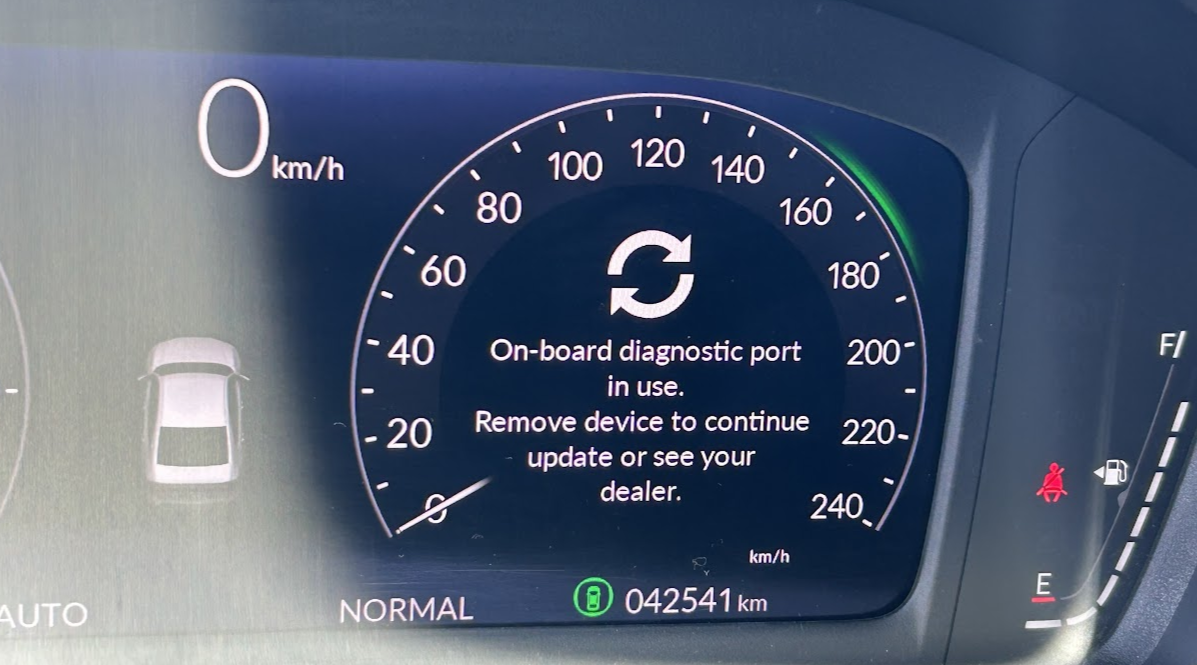
This dashboard message has been found to appear in two specific instances:
- When the vehicle automatically checks for updates
- When the operator of the vehicle manually checks for updates
The presence of an aftermarket device (in this case, the GO Device) will result in the update procedure getting interrupted, and the aforementioned message to be displayed.
This dashboard message does not coincide with any vehicle interoperability or drivability symptoms.
RESOLUTION / WORK AROUND
NOTE: Removing the GO Device is not required.
NOTE: Listen Only Mode (LOM) is a Confirmed work around.
NOTE: For PHEV, update while the vehicle is not plugged-in.
To successfully apply the vehicle update without disturbing your professional installation, follow the procedure as outlined below:
Manually check for the update(s) in accessory (ACC) mode. For this the following steps are recommended to take:
- Turn your vehicle completely OFF
- After 30 seconds (or when the red Ignition light is OFF) put your vehicle in ACC mode.
- NOTE: ACC mode refers to the position just before the engine “starts”.
- The above timing window is recommended to ensure the GO Device is not still communicating / transmitting requests to the vehicle.
- In ACC mode, check for the OEM update(s).
- Your vehicle will now be able to receive & apply updates without interruption.
- Proceed to install updates as normal
QUESTIONS?
If you are a Customer and have additional questions or these symptoms have been observed in other vehicles, promptly reach out to your Authorized Geotab Partner. If you are a Partner, please have a case created with Geotab Support at: MyAdmin Partner case
SUPPLEMENTAL INFORMATION
NOTE: when the vehicle is installing the OEM update it will not be able to turn ON until the update is complete, this is expected behavior from the vehicle. See reference below: https://techinfo.honda.com/rjanisis/pubs...